How to Add Reviews to Squarespace Using Senja: Step-by-Step Guide
By Chrisianie Pacheco

If you're wondering how to add reviews to Squarespace, you're already thinking about one of the most important factors that influences whether someone buys from you or leaves your website.
People rarely make purchasing decisions based on your website copy alone. They want proof that real people have trusted you, achieved results, and enjoyed working with your business. That's where reviews and testimonials become one of the highest-converting sections on any website.
Whether you're a creator selling digital products, a coach booking discovery calls, a beauty brand launching new services, or an educator growing an online community, strategically displaying customer reviews can dramatically increase trust before a visitor ever reaches your contact page.
The challenge isn't collecting testimonials anymore, it's presenting them in a way that feels modern, organized, and believable.
Instead of manually creating testimonial sections every time you receive new feedback, platforms like Senja make it incredibly easy to collect, organize, and display social proof across your Squarespace website.
In this guide, you'll learn exactly how to add reviews to Squarespace using Senja, where to place them for maximum impact, and how to turn testimonials into one of your strongest conversion tools.
Why Reviews Matter More Than Ever on Your Squarespace Website
No matter how beautiful your website looks, visitors are always asking themselves one question:
"Can I trust this business?"
That's exactly what reviews answer.
Great design captures attention, but social proof on Squarespace builds confidence. Reviews reassure potential customers that other people have already taken the leap, had a positive experience, and achieved real results.
This is especially important for service-based businesses where people aren't buying a physical product. They're investing in your expertise, your process, and the outcome you promise.
That's why testimonials often become one of the most-viewed sections on a website.
Reviews Reduce Buying Hesitation
Imagine you're comparing two coaches who offer similar services.
The first website explains their process beautifully but doesn't include a single client testimonial.
The second website features dozens of verified reviews, video testimonials, before-and-after success stories, and photos from real clients.
Which business would you feel more confident hiring?
For most people, the answer is obvious.
Reviews reduce uncertainty by showing that your offer has already helped others achieve similar goals.
Instead of telling visitors you're trustworthy, your customers do it for you.
Testimonials Help Every Stage of the Customer Journey
Reviews aren't only valuable on your homepage.
Different types of testimonials can support visitors throughout their decision-making process.
For example:
A homepage can feature a carousel of short customer quotes.
A sales page can include longer transformation stories.
A course landing page can showcase student success.
A service page can highlight industry-specific testimonials.
A checkout page can reinforce confidence with recent reviews.
The more relevant your testimonials are to the page someone is viewing, the more persuasive they become.
Why We Recommend Senja Instead of Building Testimonials Manually
There are plenty of ways to display reviews on a Squarespace website.
You could manually design testimonial sections, update them every time you receive new feedback, and spend hours adjusting layouts whenever your website changes.
Or you can use a system that's designed specifically for collecting, organizing, and displaying testimonials in minutes.
That's why Senja has become one of our favorite tools at Fav Studio.
Rather than treating testimonials like static website content, Senja turns them into a living library that grows with your business.
Instead of editing your Squarespace pages every time you receive a new review, you simply add the testimonial to Senja, and your embedded testimonial section updates automatically.
For creators and growing businesses, this saves an incredible amount of time while keeping your website fresh.
What Makes Senja Different?
Senja isn't just another review widget.
It's an all-in-one testimonial management platform that helps you collect, organize, and publish customer feedback without relying on multiple tools.
With Senja, you can:
Collect testimonials through branded request forms.
Import reviews from platforms like Google and social media.
Organize testimonials into collections.
Display text reviews, videos, and vertical videos.
Embed testimonial walls anywhere on your Squarespace website.
Update reviews without editing your website.
Instead of rebuilding testimonial sections every few months, you create them once and let Senja handle the updates.
It's Perfect for Creators and Service Businesses
One of the reasons we recommend Senja for Squarespace is because it works well across so many different industries.
Whether you're running a coaching business, creative studio, online course, beauty brand, consulting agency, membership community, or digital product business, testimonials become one of your strongest trust signals.
Because Senja supports multiple display formats, you're not limited to a single layout.
You can match the style of your testimonials to the purpose of each page, creating a much more intentional user experience.
What Types of Reviews Can You Add to Squarespace Using Senja?
One of the biggest reasons we recommend Senja for Squarespace is that you're not limited to a single testimonial style.
Different businesses build trust in different ways. A coach might benefit from vertical video testimonials, while an educator may prefer a clean list of student success stories. The flexibility of Senja allows you to choose layouts that match your brand while showcasing authentic customer experiences.
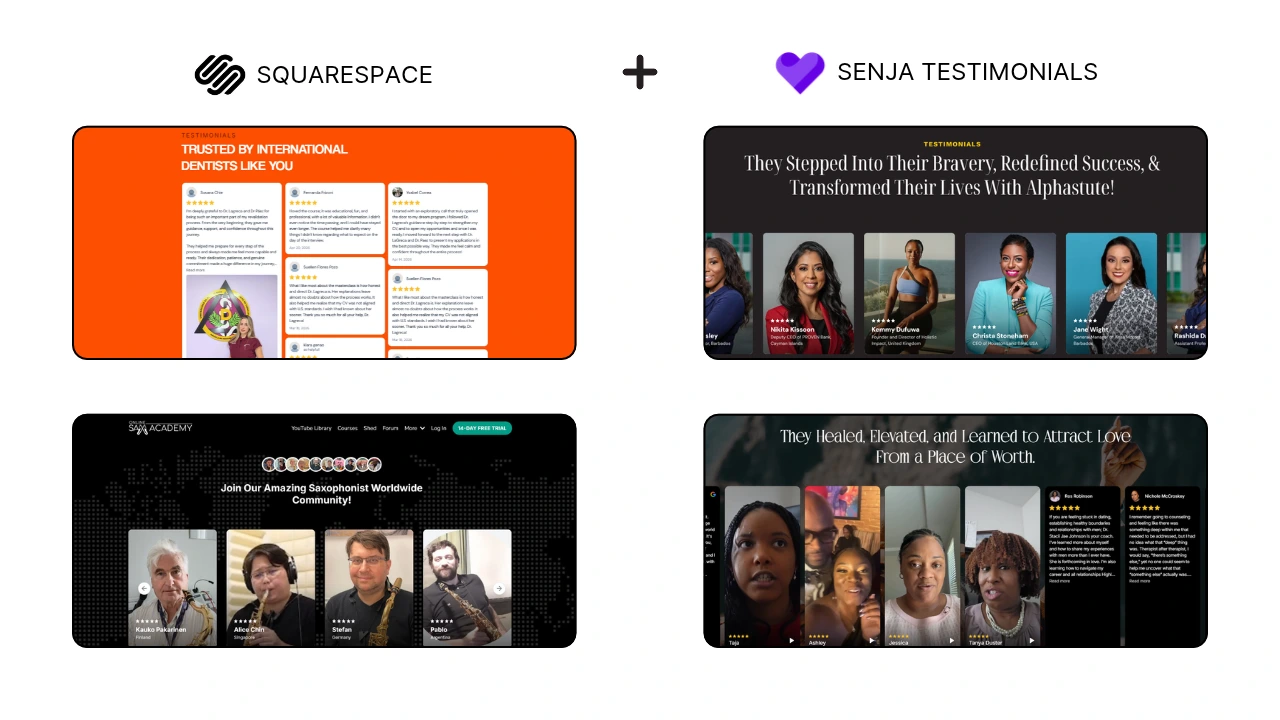
Here are four real examples of how businesses are using Senja to display reviews on their Squarespace websites.
1. Masonry Review Wall - Perfect for Displaying High Volumes of Social Proof
If you've collected dozens or even hundreds of customer reviews, a masonry layout is one of the best ways to showcase them without overwhelming visitors.
Instead of highlighting just a few testimonials, this layout creates an engaging wall of social proof where potential customers can scroll through authentic experiences at their own pace.
This style works particularly well for businesses with a strong track record because it immediately communicates credibility through volume.
2. Classic Testimonial List - Great for Service-Based Businesses
Not every website needs a large testimonial wall.
A clean, organized list of testimonials is often the better choice for coaches, consultants, educators, and professional service providers. Visitors can easily read individual success stories without feeling distracted, making this layout ideal for building trust through thoughtful, detailed client experiences.
3. Community Testimonials - Perfect for Memberships and Online Programs
For communities and membership-based businesses, trust isn't built by a single review. It's built by showing that real people from around the world are actively participating and benefiting from the experience.
This layout combines member photos, testimonials, and community-focused messaging to create a strong sense of belonging before someone even joins.
It's an excellent option for online academies, memberships, and educational platforms where community is part of the value proposition.
4. Vertical Video Testimonials - Ideal for Coaches and Personal Brands
Vertical videos continue to outperform many traditional testimonial formats because they feel authentic and familiar.
Instead of polished promotional videos, visitors see real people sharing genuine experiences in a format they're already used to from Instagram Reels, TikTok, and YouTube Shorts.
This approach is especially effective for coaches, creators, and educators where personality and trust play a major role in the buying decision.
How to Add Reviews to Squarespace Using Senja, Step-by-Step
Now it's time to add your reviews to Squarespace using Senja.
The setup is quick, beginner-friendly, and doesn't require coding. Once your testimonials are connected, you can manage everything from Senja without updating your Squarespace website every time you receive a new review.
Let's go through the process.
Step 1: Create a Free Senja Account
Start by creating a free Senja account. Once you're signed in, you'll have access to your dashboard where you can collect, organize, and manage all of your testimonials in one place.
If you don't have an account, you can sign up here.

Step 2: Add or Import Your Testimonials
Next, add your existing testimonials. You can manually enter reviews, collect new ones using Senja Forms, upload videos, or import reviews from supported platforms.
We also recommend organizing testimonials into collections so they're easier to use across different pages on your website.
Step 3: Choose Your Testimonial Layout
Select a layout that matches your website and your goals. Senja offers several display options, from simple carousels to masonry walls and video testimonials.
Choose the format that best fits the page where your reviews will appear.
Carousel: Homepages
Masonry Wall: Sales Pages
Grid: Service Pages
Video Wall: Coaching Programs
Community Showcase: Membership Sites
Step 4: Customize the Design
Before embedding your testimonials, customize the design to match your brand.
You can adjust colors, fonts, spacing, card styles, and more so the testimonial section blends seamlessly with your Squarespace website.
Step 5: Copy the Embed Code
Once you're happy with the design, click Embed and copy the generated code.
This code connects your Senja testimonial collection to your Squarespace website, so future reviews can appear automatically without creating a new section each time.
Step 6: Paste the Code Into Squarespace
Open the page where you want your testimonials to appear, add a Code Block, and paste the Senja embed code.
Save and publish the page, and your testimonials will be displayed instantly. From now on, you can manage your reviews directly in Senja, making updates much faster and easier.
Where Should You Place Testimonials on Your Squarespace Website?
Adding reviews is only part of the strategy. Placing them in the right locations helps build trust exactly when visitors need it most.
Here are some of the best places to showcase your testimonials:
Homepage - creates a strong first impression.
Service pages - reinforce your expertise.
Sales pages - increase buyer confidence.
Course or product pages - highlight customer success.
Contact page - encourage visitors to take the next step.
Think about the questions or objections a visitor might have on each page, then use testimonials to answer them naturally.
Common Mistakes to Avoid When Adding Testimonials
Even great testimonials can lose their impact if they're not presented effectively. Avoid these common mistakes to create a more trustworthy and professional website.
Using Generic Testimonials
Reviews like "Great service!" don't tell future customers much.
Instead, highlight testimonials that explain the client's experience, the problem they faced, and the results they achieved.
Specific details make testimonials far more believable.
Forgetting Photos or Names
Whenever possible, include your client's name, business, or photo.
Adding these details makes reviews feel more authentic and helps visitors trust that they're from real people.
Hiding Testimonials on One Page
Many businesses create a testimonials page but never use reviews anywhere else.
Instead, spread your testimonials throughout your website so visitors see social proof while they're making decisions.
Can Testimonials Help Your Squarespace SEO?
While testimonials alone won't instantly improve your rankings, they can support your overall Squarespace SEO strategy in several ways.
Fresh customer reviews add new content to your website over time, helping keep pages relevant and engaging. They also naturally include words and phrases your customers use when describing their experience, which can strengthen your page's topical relevance.
Most importantly, testimonials improve user experience. Visitors who spend more time reading your reviews are more likely to explore additional pages and take action.
When combined with quality content and proper keyword optimization, social proof on Squarespace becomes another valuable part of your SEO strategy.
Why Senja Is One of Our Favorite Testimonial Tools
We've worked with a variety of website platforms and social proof tools, and Senja continues to stand out because it keeps the entire testimonial process simple.
Instead of collecting reviews in one place and manually updating your website somewhere else, everything is managed from a single dashboard. Once your testimonials are embedded, adding new reviews only takes a few clicks.
For creators, coaches, educators, beauty brands, and service-based businesses, this means less time maintaining your website and more time focusing on your clients.
At Fav Studio, we look for tools that are easy to maintain as your business grows.
Senja checks all the boxes because it lets you:
Collect written and video testimonials.
Organize reviews into collections.
Customize layouts to match your brand.
Update testimonials without editing your website.
Embed reviews anywhere on Squarespace.
It's a simple system that helps your website stay current while continuously building trust with new visitors.
If you're ready to start building your own testimonial library, you can create a free Senja account using our referral link:
Frequently Asked Questions About Adding Reviews to Squarespace
Can I add testimonials to Squarespace without coding?
Yes. If you're using Senja, you only need to copy the generated embed code and paste it into a Squarespace Code Block. The process is beginner-friendly and only takes a few minutes.
Can I add video testimonials to Squarespace?
Absolutely. Senja supports both text and video testimonials, making it easy to showcase customer stories in the format that best fits your brand. Video testimonials are especially effective for coaches, creators, consultants, and service-based businesses because they add an extra layer of authenticity.
Will my testimonials update automatically?
Yes. Once your Senja testimonial collection is embedded on your Squarespace website, any new reviews you add to that collection can automatically appear on your site. There's no need to replace the embed code or redesign the section each time you receive a new testimonial.
Where should I place testimonials on my website?
Some of the best places to display testimonials include your homepage, service pages, sales pages, course pages, and contact page. Place them where visitors are most likely to have questions or need reassurance before taking the next step.
Is Senja free to use?
Yes. Senja offers a free plan that allows you to start collecting and displaying testimonials. As your business grows, you can upgrade to access additional layouts, customization options, and advanced features.
If you'd like to try it yourself, you can create a free account here:
Turn Customer Reviews Into One of Your Biggest Competitive Advantages
Learning how to add reviews to Squarespace is about more than adding another section to your website. It's about creating trust before someone ever contacts you or makes a purchase.
When your testimonials are displayed thoughtfully, they answer questions, reduce hesitation, and reinforce the value of your offer through the voices of real customers.
Instead of manually updating reviews every few months, tools like Senja make it easy to build a testimonial system that grows alongside your business. Whether you're showcasing written reviews, video testimonials, or community success stories, the right social proof can make a lasting impression on every visitor.
Ready to Build a More Trustworthy Squarespace Website?
A beautiful website gets attention, but trust is what turns visitors into customers.
By combining thoughtful website design with authentic customer reviews, you create an experience that feels credible, professional, and genuinely helpful. That's exactly why testimonials should be treated as part of your overall website strategy, not just another design element.
At Fav Studio, we help creators, coaches, educators, beauty brands, and growing businesses build Squarespace websites that are designed to attract the right audience and convert with confidence. From SEO and content strategy to website design and digital systems, we create websites that support long-term growth.
If you're ready to build a website that earns trust and drives results, we'd love to help.
Explore our services, book a strategy session, and let's create a Squarespace website that turns your customer success stories into your strongest marketing asset. Start a project with us today!