How to Add Testimonials to Kajabi Using Senja (Step-by-Step Tutorial)
By Chrisianie Pacheco
Chrisianie Pacheco is the founder of Fav Studio, a creative studio specializing in Kajabi design, creator websites and third-party Kajabi templates.
Kajabi testimonials are one of the most underleveraged conversion tools on any creator or coach's website and most people are either skipping them entirely or slapping a screenshot into a section and calling it done. Neither approach is doing your business any favors.
Here's what's actually happening when a potential buyer lands on your Kajabi site: they're looking for proof. Not your bio, not your feature list, not your beautifully designed homepage hero. They want to know if someone like them has already taken the leap and whether it worked. That's what testimonials do. And when they're done right, they close deals you didn't even know were on the table.
In this tutorial, we're walking through exactly how to collect, manage, and embed testimonials on your Kajabi site using Senja, the cleanest, most creator-friendly testimonial tool we've found for this exact use case. By the end of this, you'll have a social proof system that works on autopilot, looks premium, and makes your Kajabi site feel like the kind of place people trust before they've read a single word of your sales copy.
Why Most Kajabi Sites Are Losing Sales Right Where Testimonials Should Be
Before we get into the how, it's worth understanding the why, because the way most coaches and creators handle Kajabi reviews is actively costing them conversions.
The most common mistake is treating testimonials as decoration. A testimonial dumped at the bottom of a sales page, in a font that's hard to read, with no photo and no context, doesn't build trust. It fills space. And filled space that doesn't do a job is worse than empty space because it tells your visitor that social proof is an afterthought, not a priority.
The second mistake is making a testimonial collection manual. Chasing clients for reviews via DM, copy-pasting screenshots into Canva, re-uploading every time you get a new one, it's a system held together by effort instead of infrastructure. That kind of system breaks the moment you get busy. Which is exactly when you need it most.
Kajabi success stories and customer reviews should be working for you around the clock collecting automatically, displaying beautifully, and updating without you having to touch them. That's what Senja makes possible. And that's why it's the tool we recommend for any creator serious about turning social proof into a sales asset.
What Is Senja and Why It's the Best Tool for Kajabi Testimonials
Senja is a testimonial collection and display platform built specifically for the kind of creator and coach businesses that run on Kajabi. It lets you collect written and video testimonials through a beautifully designed form, manage them in one dashboard, and embed them on any page, including your Kajabi site, using a simple embed code.
What makes Senja different from just screenshotting a DM or manually building a testimonial section in Kajabi's page editor is the system behind it. Once it's set up, testimonials flow in, display automatically, and update in real time without you having to rebuild anything.
The embed is lightweight, fully customizable, and looks genuinely premium which matters enormously on a Kajabi site where your design standards are part of your brand positioning. No clunky widgets, no mismatched fonts, no design compromise.
It also has a generous free plan which means there's genuinely no reason not to start today.
→ Start collecting testimonials with Senja

Real Kajabi Sites Already Using Senja for Social Proof
Before we walk through the setup, here's what this looks like in practice. These real Kajabi websites use different Senja testimonial formats, from text reviews to video testimonials and visual testimonial walls, showing how social proof can be adapted to different brands and audiences.
1. The International Dentist (Mixed Text, Photo & Video Testimonials)
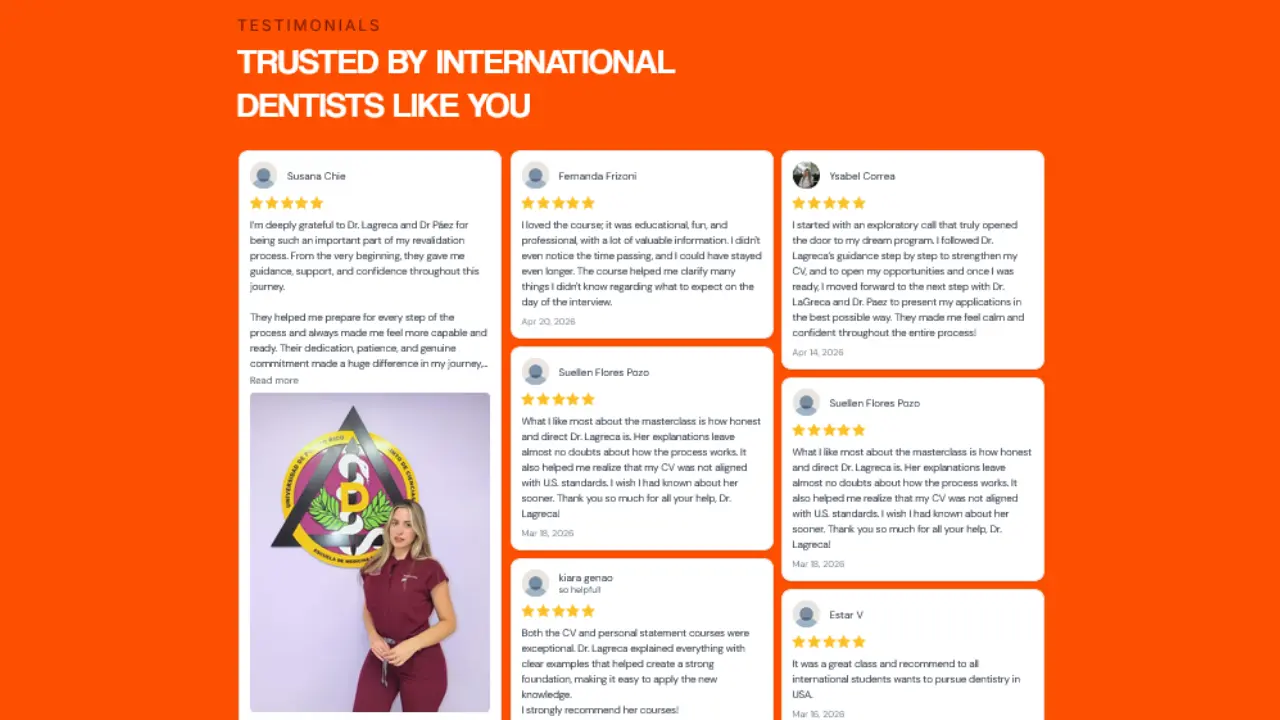
A professional services brand in a trust-critical industry, exactly the kind of site where testimonials aren't optional, they're essential. The International Dentist uses a mixed wall of text, photo and video testimonials, allowing prospective students to quickly browse written success stories while also seeing authentic video experiences. The masonry-style layout creates strong visual credibility while keeping the page dynamic and engaging.
2. Alphastute (Photo & Text Testimonials)

Alphastute is a mentorship and coaching brand where trust is built through personal transformation. Their Senja section features photo and text testimonials, pairing each review with the community member's portrait to make every story feel more personal and relatable. The clean, editorial layout blends seamlessly into the site's design while reinforcing the impact of the program through authentic voices.
3. Online Sax Academy (Photo Testimonials)

For a niche education brand, social proof reassures prospective students that people just like them have already joined, improved their skills, and become part of the community. Online Sax Academy uses photo testimonials, showcasing real members alongside their reviews to create a sense of connection and belonging. The familiar faces help transform testimonials into proof of an active, engaged learning community.
4. Stacii Jae Johnson (Vertical Video & Text Testimonials)

A personal brand site where the creator's voice and community relationship are central to the offer. Stacii Jae Johnson uses a carousel of vertical video and text testimonials, combining selfie-style videos with written reviews that feel native to today's social platforms. This format brings authenticity to the page, allowing visitors to experience real client stories in a way that feels personal, engaging, and fully aligned with the brand.
Watch the Full Tutorial: How to Set Up Senja on Your Kajabi Site for Free
Before we walk through each step in detail, watch this full video tutorial showing exactly how to connect Senja to your Kajabi site from account setup to live embed:
https://www.youtube.com/watch?v=V9UVdCjBoE0
Prefer to follow along in writing? Here's the full step-by-step breakdown.
Step-by-Step: How to Add Kajabi Testimonials Using Senja
Step 1: Create Your Free Senja Account
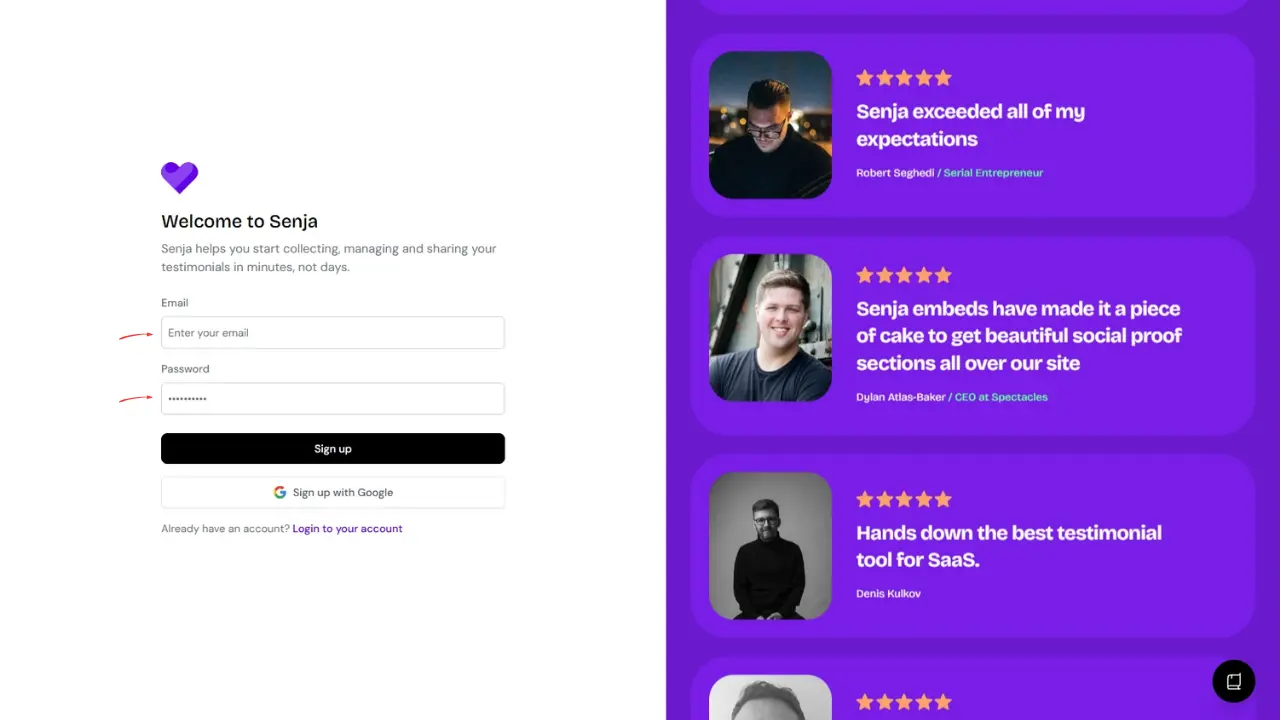
Head to Senja and create your free account. The setup only takes a couple of minutes, and once you're inside your dashboard, you're ready to start adding testimonials.
Step 2: Import Your Testimonials
Instead of collecting testimonials one by one, Senja lets you import testimonials you've already received.
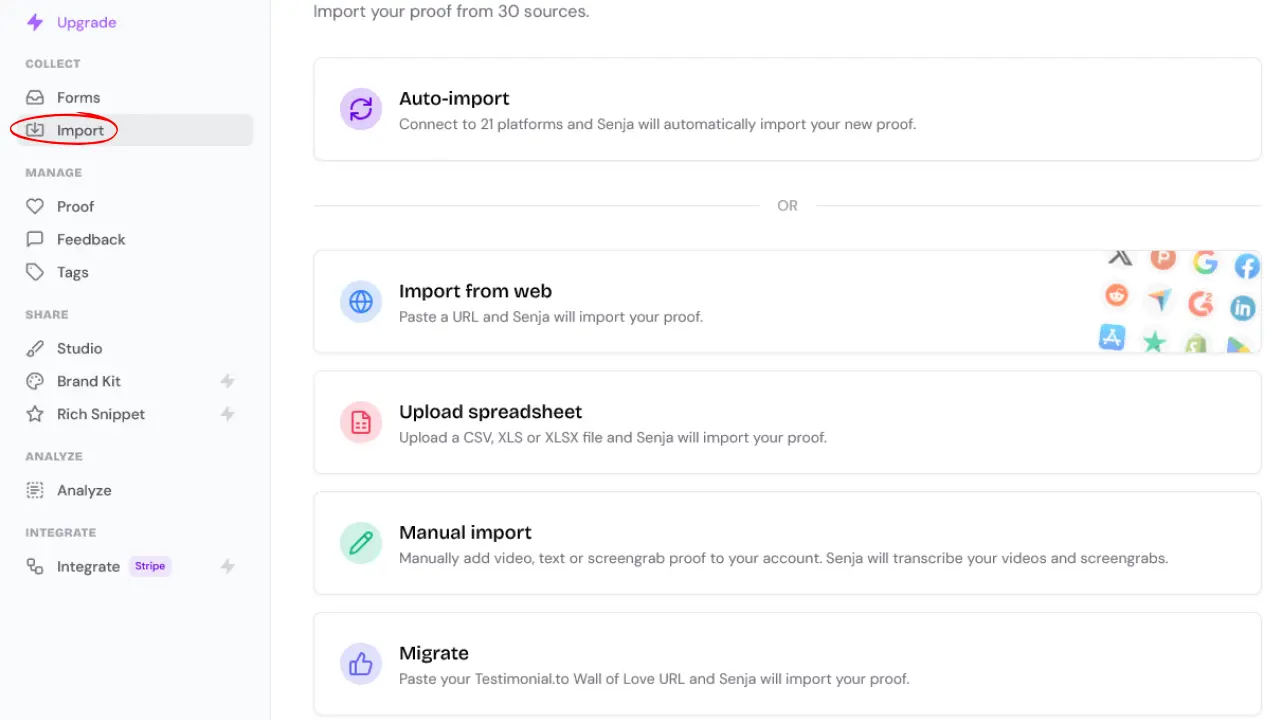
Inside your dashboard, click Import, then choose how you'd like to add your testimonials. Depending on where they're stored, you can:
Import from a website
Import manually
Import from supported platforms
Once your testimonials have been imported, review them and click Save.
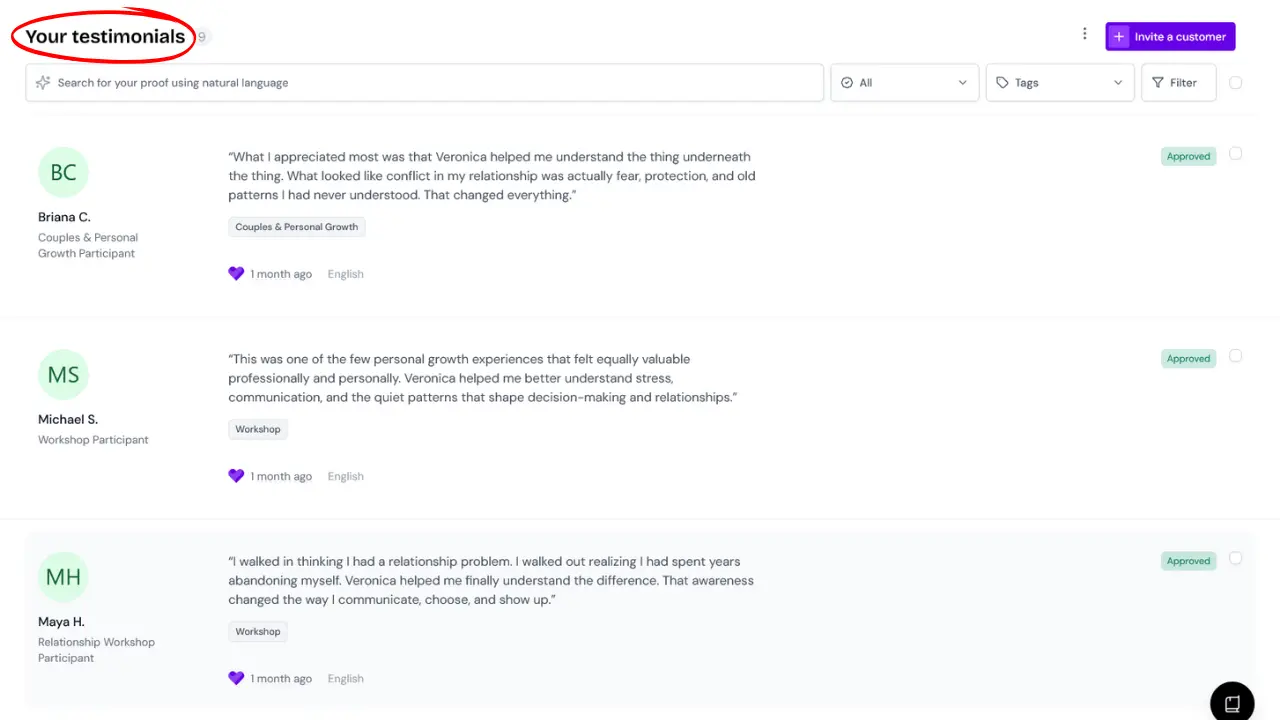
Step 3: Manage Your Testimonials
After importing your testimonials, they'll appear in your Senja dashboard where you can review and organize everything in one place.
You can:
Approve testimonials before displaying them
Tag them by offer or program
Organize them into different collections
Choose which testimonials you want to display on each widget
Keeping your testimonials organized makes it easy to show the most relevant social proof on each Kajabi page.
Step 4: Create Your Senja Widget
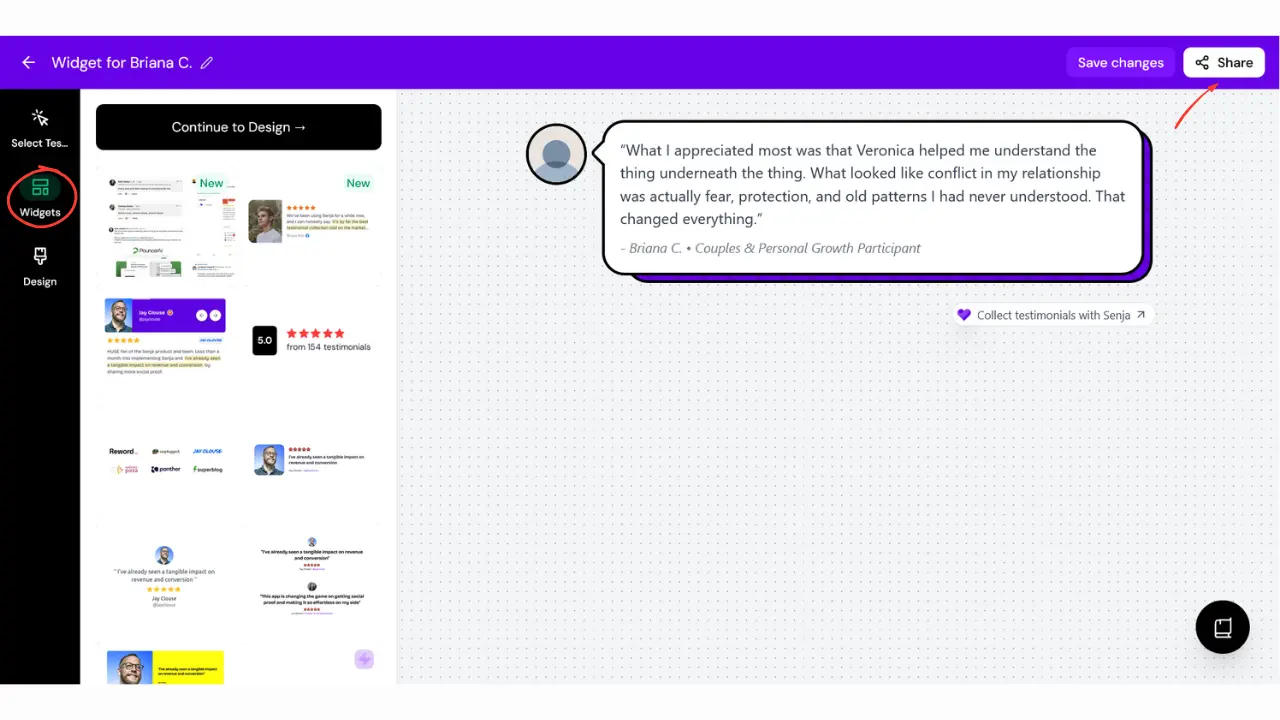
Once your testimonials are ready, head to Widgets and choose how you'd like them to appear on your Kajabi website.
Popular widget styles include:
Wall of Love for showcasing multiple testimonials at once
Carousel for rotating testimonials
Single Testimonial to highlight one standout review
Floating Widget for always-visible social proof
Customize the widget to match your brand, then click Generate Embed Code.
Step 5: Embed the Widget in Kajabi
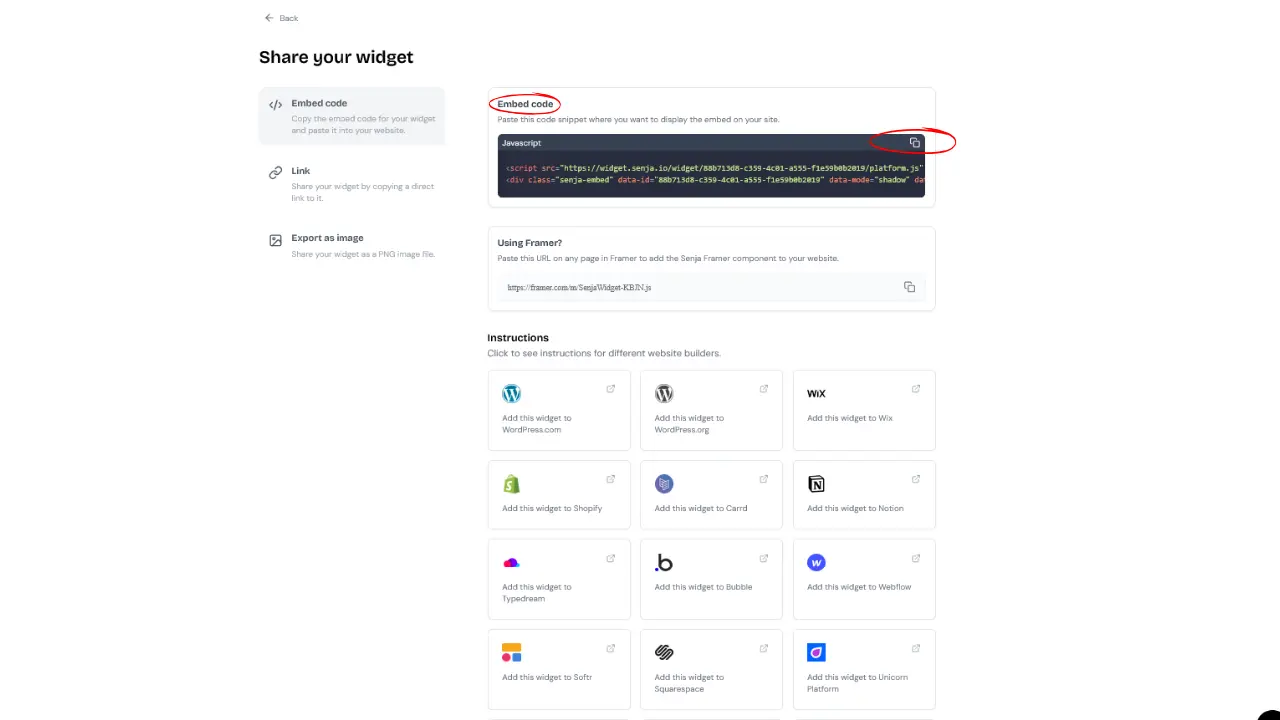
Copy the embed code generated by Senja, then open the Kajabi page where you'd like your testimonials to appear.
In the Kajabi page editor:
Add a Custom Code section or block.
Paste your Senja embed code.
Save your changes.
Preview the page.
Publish when you're happy with the placement.
Once published, your Senja widget will automatically display your testimonials on your Kajabi website.
Where to Place Kajabi Testimonials for Maximum Conversion Impact
Getting the embed right is only half the strategy. Where you place your Kajabi testimonials determines how hard they actually work and most creators default to a single testimonials page that almost no one visits organically.
Here's where to place them instead:
On your homepage — above the fold if your brand is established, or just below your hero section if you're still building recognition. Either way, testimonials on the homepage signal immediately that real people trust you.
Directly above your primary CTA on sales pages — this is the highest-leverage placement. A buyer who's almost ready to say yes just needs one more piece of confirmation. A strong testimonial placed right before the buy button provides exactly that.
On your about page — where trust is being established, social proof accelerates it. Let your clients speak for you in the space where you're talking about yourself.
Inside your course or membership area — for community-building and retention. Seeing other students' wins reinforces that people stay, engage, and get results.
On a dedicated Kajabi reviews or success stories page — useful for SEO and for buyers who want to do deep research before committing to a higher-ticket offer.
FAQ: Kajabi Testimonials and Senja
Can I Add Testimonials to Kajabi Without Custom Code?
Kajabi's native page editor has basic text and image blocks you can use to manually display testimonials but they're static, require manual updating every time you add a new review, and don't have the display quality of a dedicated tool. Senja's embed code approach takes about sixty seconds to implement and gives you a dynamic, auto-updating testimonial display that looks significantly more polished. The custom code block in Kajabi makes this straightforward even if you've never touched code before.
Is Senja Free to Use With Kajabi?
Yes, Senja has a free plan that includes testimonial collection, a basic widget, and embed functionality, which is more than enough to get started. Paid plans unlock additional widget styles, more testimonials, video testimonials, and advanced customization. For most creators starting out, the free plan covers everything needed to get a professional testimonial system live on their Kajabi site.
→ Start for FREE here
How Do I Get More Clients to Leave Kajabi Testimonials?
Timing and framing are everything. The best moment to ask is when a client has just experienced a win, not at the end of a program when momentum has dropped. Automate your Senja form link into your Kajabi email sequence to go out at the moment of peak satisfaction. And ask specific questions that prompt specific answers, "what result did you get?" produces a far more useful testimonial than "how was your experience?".
Can I Display Video Testimonials on My Kajabi Site Using Senja?
Yes, Senja supports video testimonial collection and display on its paid plans. Video Kajabi success stories are among the most powerful conversion tools available to coaches and creators because they combine specificity, emotion, and credibility in a way that written text alone can't match. If you have clients willing to record a short video review, getting those into a Senja widget and embedding them on your Kajabi sales pages is one of the highest-ROI moves you can make.
Does Senja Work on All Kajabi Page Types?
Yes, Senja's embed code works anywhere Kajabi allows a custom code block, which includes landing pages, sales pages, website pages, and course pages. The only Kajabi areas where custom code blocks aren't available are inside the native email builder and certain community sections but for any public-facing page on your Kajabi site, Senja embeds cleanly and reliably.
Your Kajabi Site Should Be Closing Deals While You Sleep
Every buyer who lands on your Kajabi site and leaves without converting needs one more thing: proof that this works for someone like them. That's not a copywriting problem. That's a social proof problem. And it has a very straightforward fix.
Senja turns your clients' words into a conversion system, one that collects automatically, displays beautifully, and updates without you touching anything. Pair that with a Kajabi site that's been built with strategic intention, and your social proof stops being a section on a page and starts being one of the hardest-working parts of your entire sales ecosystem.
Set up your Senja account today and get your first testimonial widget live on your Kajabi site before the end of the week. It's free to start, it takes less than an hour to implement, and the compounding effect of great social proof on a well-built Kajabi site is one of the most reliable revenue levers available to any coach or creator.
→ Start FREE with Senja here
And if your Kajabi site needs more than better testimonials, if the design, the structure, or the strategy isn't doing the work it should. Book a strategy session with Fav Studio and let's build a site that converts from every angle.
Book a strategy session → start a project