How to Add Keywords to Squarespace Without Hurting Your SEO
By Chrisianie Pacheco
If you've been wondering how to add keywords to Squarespace, you're not alone. Many creators assume that adding the same keyword everywhere will automatically improve rankings. In reality, that approach often does more harm than good.
Search engines have become much smarter over the years. Instead of rewarding websites that repeat the same phrase dozens of times, they now prioritize content that genuinely helps people answer their questions. That means successful Squarespace SEO is less about stuffing keywords into every corner of your website and more about creating a clear structure that tells Google exactly what each page is about.
Whether you're a coach selling online programs, a beauty brand launching new products, an educator growing a digital audience, or a lifestyle creator building your personal brand, understanding how Squarespace keywords work can make the difference between a website that gets discovered and one that stays hidden.
The good news is that Squarespace already includes many SEO-friendly features. The challenge is knowing how to use them strategically. Instead of chasing outdated SEO tricks, you'll learn how to build a keyword strategy that supports long-term visibility while keeping your website natural, engaging, and user-friendly.
In this guide, we'll walk through exactly where to add keywords in Squarespace, how to optimize every important SEO element, and what mistakes to avoid if you want sustainable search rankings.

Why Keywords Still Matter for Squarespace SEO
Keywords remain one of the strongest signals search engines use to understand your website. They help Google connect your content with the people actively searching for your products, services, or expertise.
Think of keywords as the language your audience already uses. If someone searches for "branding coach for creatives" or "natural skincare routine," Google looks for pages that clearly demonstrate they're about those topics. Your job isn't to force those words into every sentence, it's to naturally communicate your expertise through well-structured content.
This is why Squarespace search optimization starts with understanding search intent instead of focusing only on keyword placement. Every page should answer one primary question while supporting related topics naturally.
When Google can confidently identify the purpose of your page, it becomes much easier for that page to appear in relevant search results.
Keywords Help Google Understand Context
Years ago, SEO often involved repeating the same keyword over and over. Today, Google's algorithms evaluate the overall context of your content instead.
For example, a page targeting How to Add Keywords to Squarespace might naturally include phrases like:
Squarespace SEO
optimize Squarespace SEO
Squarespace search optimization
SEO page settings
meta titles
search visibility
website optimization
These related terms help build topical authority without making your writing feel repetitive.
Instead of asking yourself, "How many times should I use this keyword?", ask, "Have I fully answered the reader's question?"
That mindset leads to stronger rankings and a much better user experience.
How to Add Keywords to Squarespace the Right Way
Understanding how to add keywords to Squarespace begins with knowing where Google actually looks for them. Many website owners focus only on their page content, but search engines evaluate multiple elements across every page.
Rather than placing keywords randomly, you should optimize each SEO area with a specific purpose. Every placement should help clarify the topic of your page while improving the experience for your visitors.
Let's break down the most important places where keywords belong.
1. Page Titles
Your page title is one of the most important SEO elements on your website. It tells both search engines and visitors what the page is about before they even click.
Instead of writing something vague like:
Home
Try something more descriptive like:
Brand Strategy Services | Fav Studio
Or if you're writing a blog post:
How to Add Keywords to Squarespace Without Hurting Your SEO
Including your primary keyword naturally at the beginning of the title can improve relevance while keeping it readable.
2. SEO Titles
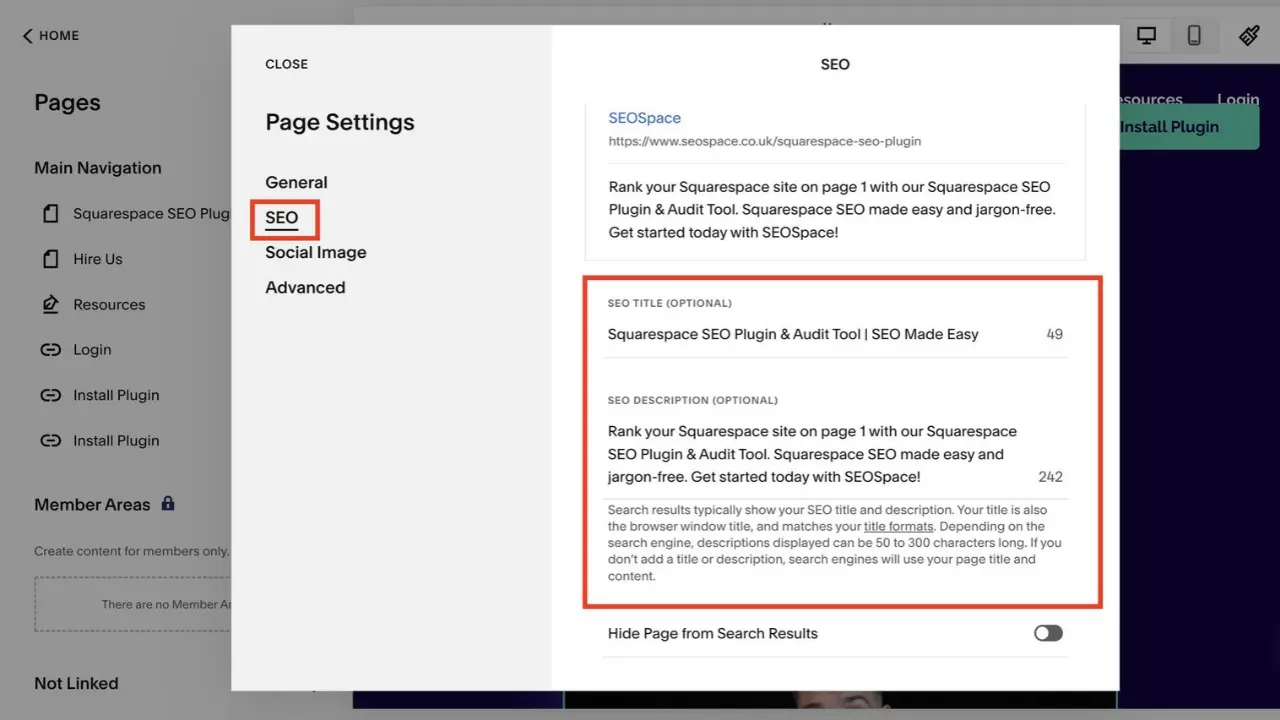
Squarespace allows you to customize an SEO title separately from your navigation title.
This gives you the flexibility to write titles specifically designed for search results while keeping your website navigation clean and user-friendly.
A strong SEO title should:
Include your primary keyword naturally.
Stay under approximately 60 characters.
Clearly describe what users will learn.
Encourage clicks without sounding clickbait.
For example:
How to Add Keywords to Squarespace Without Hurting SEO
This immediately communicates value while matching the user's search intent.
3. Meta Descriptions
Meta descriptions don't directly improve rankings, but they have a significant impact on click-through rates.
When people see your page in Google search results, your meta description often determines whether they choose your website or someone else's.
A good meta description should:
Include the primary keyword naturally.
Summarize the page clearly.
Stay under approximately 155 characters.
Give readers a compelling reason to click.
Think of it as your page's elevator pitch.
Where Else Should You Place Keywords on Your Squarespace Website?
Adding keywords doesn't stop with titles and descriptions. To truly optimize Squarespace SEO, your keywords should appear naturally throughout your website wherever they help provide context.
The key word here is naturally.
Google wants to reward websites that are genuinely useful, not pages that repeat the same phrase every few lines.
Instead, focus on building consistency across every important SEO element while writing for real people first.
In the next section, we'll cover exactly how to optimize headings, URLs, image alt text, blog content, and internal links without crossing into keyword stuffing.
How to Optimize Headings for Better Squarespace SEO
Your headings do more than make your content easier to read, they help search engines understand the structure of your page. Think of them as signposts that guide both your visitors and Google through your content.
When you're learning how to add keywords to Squarespace, your headings are one of the best places to naturally include your primary and secondary keywords. Instead of forcing keywords into every heading, write headings that accurately describe the section while matching what your audience is searching for.
A well-structured page is easier to scan, keeps readers engaged longer, and helps search engines identify the most important topics on your page.
Use Only One H1 Per Page
Every page should have one clear H1 that represents the main topic. For this article, the H1 is:
How to Add Keywords to Squarespace Without Hurting Your SEO
This immediately tells both readers and search engines what the page is about.
Avoid using multiple H1 tags on the same page. Instead, organize the rest of your content using H2s and H3s to create a logical hierarchy.
A simple structure looks like this:
H1, Main page topic
H2, Main sections
H3, Supporting details
H4, Only if additional organization is needed
This structure improves readability while supporting stronger Squarespace search optimization.
Add Keywords Naturally Throughout Your Content
One of the biggest misconceptions about SEO is that using your keyword as many times as possible will improve rankings. In reality, keyword stuffing often has the opposite effect.
Google is designed to recognize natural language. Instead of counting how many times you've repeated a phrase, it evaluates whether your content thoroughly answers the reader's question.
For example, if your page is about how to add keywords to Squarespace, you don't need to repeat that exact phrase in every paragraph.
Instead, naturally include related phrases such as:
Squarespace SEO
Squarespace keywords
optimize Squarespace SEO
Squarespace search optimization
SEO settings
search visibility
organic traffic
These supporting terms help build topical relevance without making your writing feel repetitive.
Focus on Solving One Search Intent
Every page on your website should have one clear purpose.
For example:
A service page should explain your offer.
A blog post should answer a specific question.
A landing page should guide visitors toward a conversion.
A portfolio page should showcase your work.
Trying to rank one page for ten different topics usually weakens your SEO. Instead, create focused pages that answer one primary question exceptionally well.
This strategy makes it easier for Google to understand your content and gives visitors a better experience because they find exactly what they were searching for.
Optimize Your URLs Before Publishing
Your page URL is another important SEO signal that's often overlooked.
Squarespace automatically creates URLs based on your page title, but taking a few extra moments to customize them can improve both user experience and search visibility.
A clean URL is easier to understand, easier to share, and gives search engines another clue about the page's topic.
For example, instead of:
yourwebsite.com/blog/post-25
Use:
yourwebsite.com/how-to-add-keywords-to-squarespace
Simple, descriptive URLs are more likely to be clicked and are easier for users to remember.
Keep URLs Short and Descriptive
When editing your URL slug, keep these best practices in mind:
Include your primary keyword when it makes sense.
Remove unnecessary words.
Use lowercase letters.
Separate words with hyphens.
Avoid dates unless they're necessary.
Good URL:
/how-to-add-keywords-to-squarespace
Less effective URL:
/how-to-add-keywords-to-squarespace-for-beginners-to-improve-your-google-ranking-fast
Short, focused URLs tend to perform better because they're cleaner and easier to understand.
Don't Forget Image SEO on Squarespace
Images play a much bigger role in SEO than many creators realize.
While Google can't fully understand an image the way humans do, it relies on surrounding content, filenames, and alternative text to determine what that image represents.
Optimizing your images helps improve accessibility, strengthens your page's topical relevance, and creates additional opportunities to appear in image search results.
Fortunately, this is one of the easiest improvements you can make.
Rename Your Image Files Before Uploading
Instead of uploading images with filenames like:
IMG_4821.jpg
Rename them to something descriptive before uploading.
For example:
fav-studio-how-to-add-keywords-to-squarespace.webp
or
fav-studio-squarespace-seo-dashboard.webp
Search engines use filenames as another clue about your content, so descriptive names support your overall SEO strategy.
Write Helpful Alt Text
Alt text should describe the image as if you're explaining it to someone who can't see it.
Good alt text improves accessibility while reinforcing the topic of your page.
Instead of writing:
"SEO"
Try something like:
"Squarespace SEO settings showing how to optimize page titles and meta descriptions."
Notice how the keyword fits naturally into the description rather than feeling forced.
Internal Linking Helps Search Engines Understand Your Website
Internal links are one of the simplest ways to improve your Squarespace search optimization, yet they're often overlooked.
Every time you link one page of your website to another, you're helping visitors discover more of your content while also showing Google how your pages relate to each other.
For example, if this blog links to another article about writing SEO-friendly blog posts or improving website copy, Google begins to understand that these topics belong within the same content ecosystem.
Over time, this strengthens your website's authority around Squarespace SEO and related topics.
Use Descriptive Anchor Text
Instead of linking generic phrases like:
Click here
Learn more
Read this
Use descriptive anchor text that tells readers exactly what they'll find.
For example:
Learn how to write SEO-friendly website copy.
Discover our complete Squarespace SEO guide.
Explore our website strategy services.
Descriptive anchor text provides context for both users and search engines, making your internal linking strategy much more effective.
Common Keyword Mistakes That Hurt Your Squarespace SEO
Learning how to add keywords to Squarespace is only half the battle. Knowing what not to do is just as important.
Many website owners make small SEO mistakes without realizing they're limiting their visibility in search results. These mistakes usually come from outdated advice or the belief that more keywords automatically lead to higher rankings.
The reality is that Google rewards websites that provide value, answer search intent, and create a great user experience. If your content feels unnatural or repetitive, both readers and search engines will notice.
Let's look at some of the most common mistakes and how to avoid them.
Keyword Stuffing
Keyword stuffing happens when the same phrase is repeated excessively in an attempt to rank higher.
For example:
"If you want to learn how to add keywords to Squarespace, this guide on how to add keywords to Squarespace will teach you how to add keywords to Squarespace..."
Not only is this difficult to read, but it also signals to search engines that the content was written for algorithms instead of people.
A better approach is to use your primary keyword naturally where it makes sense, then support it with related phrases like Squarespace SEO, Squarespace keywords, and optimize Squarespace SEO.
If your writing flows naturally when read out loud, you're usually on the right track.
Targeting Too Many Keywords on One Page
Every page should have one primary focus.
A common mistake is trying to rank a single page for dozens of unrelated topics.
For example, imagine a blog post trying to rank for:
Squarespace SEO
Email marketing
Branding
Logo design
Website speed
Pinterest marketing
While these topics may all be relevant to your business, combining them into one article creates confusion for both readers and search engines.
Instead, build a content library where each article focuses on one primary keyword and naturally supports related keywords. Over time, these articles work together to establish your authority across your niche.
Forgetting About User Experience
SEO is no longer just about search engines.
Google measures how users interact with your website. If visitors leave quickly because your content is difficult to read, cluttered, or doesn't answer their question, your rankings can suffer.
That's why successful Squarespace search optimization always puts the reader first.
Use:
Short paragraphs
Clear headings
Helpful examples
Images that support the content
Easy-to-scan formatting
When visitors enjoy reading your content, they're more likely to stay longer, explore additional pages, and eventually become customers.
How to Find the Right Keywords Before You Write
Adding keywords to your Squarespace website starts long before you open the page editor.
The most effective SEO strategies begin with understanding what your audience is already searching for.
Instead of guessing which phrases might work, use keyword research to discover the exact language your ideal customers use when looking for solutions like yours.
This helps you create content that matches real search intent, making it much easier for Google to connect your website with the right audience.
Start With Customer Questions
One of the easiest ways to discover valuable keywords is by listening to your audience.
Think about the questions you answer repeatedly through emails, consultations, social media messages, or discovery calls.
For example:
How do I improve my Squarespace SEO?
Why isn't my website showing up on Google?
How do I get more traffic to my Squarespace site?
Where do I add keywords in Squarespace?
Each question has the potential to become a blog post that attracts organic traffic while providing genuine value.
Use Keyword Research Tools
Once you have a list of ideas, validate them using keyword research tools.
Popular options include:
Google Keyword Planner
Ahrefs
SEMrush
Ubersuggest
Google Search Console
Google autocomplete
These tools can help you identify:
Monthly search volume
Keyword difficulty
Related keyword ideas
Frequently asked questions
Long-tail keyword opportunities
Long-tail keywords are especially valuable because they often have lower competition and attract visitors with a clear intent.
Instead of targeting a broad phrase like:
Squarespace
You might target:
How to add keywords to Squarespace
The search volume may be lower, but the people searching for it are much more likely to engage with your content because it directly answers their question.
A Simple Squarespace SEO Workflow You Can Repeat
One of the biggest mistakes creators make is treating SEO as a one-time task.
In reality, strong SEO is built through consistency.
Instead of optimizing pages randomly, follow the same workflow every time you publish new content. This keeps your website organized and ensures you're covering all the important SEO elements without overlooking anything.
Here's a simple workflow you can use for every page or blog post.
Step 1, Choose One Primary Keyword
Start by identifying the main phrase you want the page to rank for.
Everything else on the page should support this keyword rather than compete with it.
Step 2, Add Supporting Keywords Naturally
Include related phrases where they fit naturally throughout your headings, paragraphs, image alt text, and metadata.
This strengthens your topical relevance without making the content repetitive.
Step 3, Optimize Every SEO Element
Before publishing, review your page and make sure you've optimized:
SEO title
Meta description
URL slug
H1 heading
H2 headings
Image filenames
Alt text
Internal links
Think of this as your pre-publish checklist.
Step 4, Publish and Monitor Performance
SEO doesn't end after you hit publish.
Use tools like Google Search Console to monitor impressions, clicks, and keyword rankings over time.
You may discover opportunities to update older content with new keywords, improve headings, or expand sections that are already gaining traction.
Small improvements over time often lead to significant long-term growth.
Frequently Asked Questions About How to Add Keywords to Squarespace
Where do I add keywords in Squarespace?
There isn't a single keyword field inside Squarespace where you can simply paste your target keywords. Instead, you should naturally add keywords throughout your website in strategic locations, including your SEO title, page title, headings, meta description, URL slug, image alt text, image filenames, and body content.
The goal is to help search engines understand your page while keeping the content helpful and easy to read.
Does Squarespace have built-in SEO tools?
Yes. Squarespace includes several built-in SEO features that make it easy to optimize your website without installing additional plugins.
Some of these features include:
Custom SEO titles
Meta descriptions
Automatic XML sitemaps
Mobile responsive templates
SSL security
Clean page URLs
Image alt text support
These tools provide a solid SEO foundation, but your content strategy and keyword optimization ultimately determine how well your website performs in search results.
How many keywords should I use on one page?
Focus on one primary keyword for each page, then naturally support it with several related keywords.
For this article, the primary keyword is How to Add Keywords to Squarespace, while related keywords include Squarespace SEO, Squarespace keywords, optimize Squarespace SEO, and Squarespace search optimization.
This approach helps search engines understand your topic without making the content feel repetitive.
Can I rank on Google using Squarespace?
Absolutely.
Squarespace is fully capable of ranking in Google search results when your website follows SEO best practices.
Success depends on creating high-quality content, optimizing each page correctly, maintaining a clear website structure, and consistently publishing content that answers your audience's questions.
The platform itself isn't the limitation. Your strategy is what makes the difference.
How long does Squarespace SEO take to work?
SEO is a long-term investment, not an overnight solution.
Depending on your industry, competition, and the authority of your website, it may take several weeks or even a few months to see meaningful improvements in rankings and organic traffic.
The most important thing is consistency. Continue publishing valuable content, refining your keyword strategy, and updating existing pages as your business grows.
Build an SEO Strategy Instead of Chasing Quick Fixes
If there's one takeaway from this guide, it's that learning how to add keywords to Squarespace isn't about finding shortcuts or trying to outsmart search engines.
The websites that consistently rank well are the ones that provide the best experience for their audience.
That means creating content with a clear purpose, organizing your pages thoughtfully, and using keywords where they genuinely add context.
Rather than asking, "How many times should I use this keyword?", ask yourself, "Will this page completely answer my visitor's question?"
When you focus on delivering value first, your SEO naturally becomes stronger.
The best-performing websites aren't built overnight. They're built through intentional improvements that compound over time.
Whether you're a creator launching your first website, a coach growing your online presence, or a beauty brand expanding your reach, investing in sustainable Squarespace SEO will continue to pay dividends long after your content is published.
Ready to Turn Your Squarespace Website Into a Growth Engine?
Adding keywords is an important step, but it's only one piece of a successful SEO strategy.
The websites that consistently attract qualified traffic are built with a combination of thoughtful content, strategic website structure, user-focused design, and ongoing optimization. When all of these elements work together, your website becomes more than just an online presence, it becomes a valuable asset that supports your business around the clock.
At Fav Studio, we help creators, coaches, educators, beauty brands, and growing businesses build websites that are designed to do more than look good. We create content strategies, SEO foundations, and digital systems that help your audience discover you, trust you, and take action.
Whether you're launching a new Squarespace website or improving an existing one, our goal is to help you build a website that supports long-term growth, not just short-term traffic.
If you're ready to transform your website into a powerful marketing tool, we're here to help. Explore our services, book a strategy session, and let's build a website that turns visibility into revenue.